

Extract delivery notes with
generative AI and OCR
Automate the capture of your delivery note data and manage everything from a centralized platform. Digitizing delivery notes with OCR and AI has never been easier: upload a photo and get all the structured data instantly.
Credits with no commitment or expiration date
In 20 seconds, we’ll show you why Dijit.app is your best ally
Why should you choose us? Because our software is ultra-precise and ultra-fast. See how Dijit.app transforms hundreds of delivery notes into structured data, ready for your ERP in real time.
Capture all the data from your delivery notes
Our specialized AI automatically identifies and extracts every field from your delivery notes. Digitizing delivery notes with OCR and AI makes it possible to capture everything from header data to the full product details with 99.99% accuracy.
Header data
Automatic capture of all supplier and document information.
- Delivery note number and date
- Full supplier data
- Tax ID and tax details
- Delivery address
- Order number
- Cost center
- Buyer data
Purchase list
Complete extraction of the products and services table.
- Product description and code
- Quantities, weights, and measurements
- Unit prices and discounts
- Total amounts per line
- EAN codes and references
- Batches and expiration dates
- VAT percentages
Automatic extraction process
Digitizing delivery notes with OCR and AI turns physical documents into structured data ready to use.
Capture the delivery note
From any formatUpload a photo from your mobile phone or scan the delivery note. Our system accepts any format, quality, or capture angle.
Reading with AI and Pro OCR
Beyond traditional scanningPro OCR combined with generative AI interprets the structure of the delivery note: it identifies the header, supplier, batches, and each product line.
Structured data
Ready for your ERPThe captured data is instantly available in your admin panel, ready to export or integrate with your ERP.
Need specific fields?
Customize the extraction to fit your needs. We can adapt the system to capture any specific data from your delivery notes.
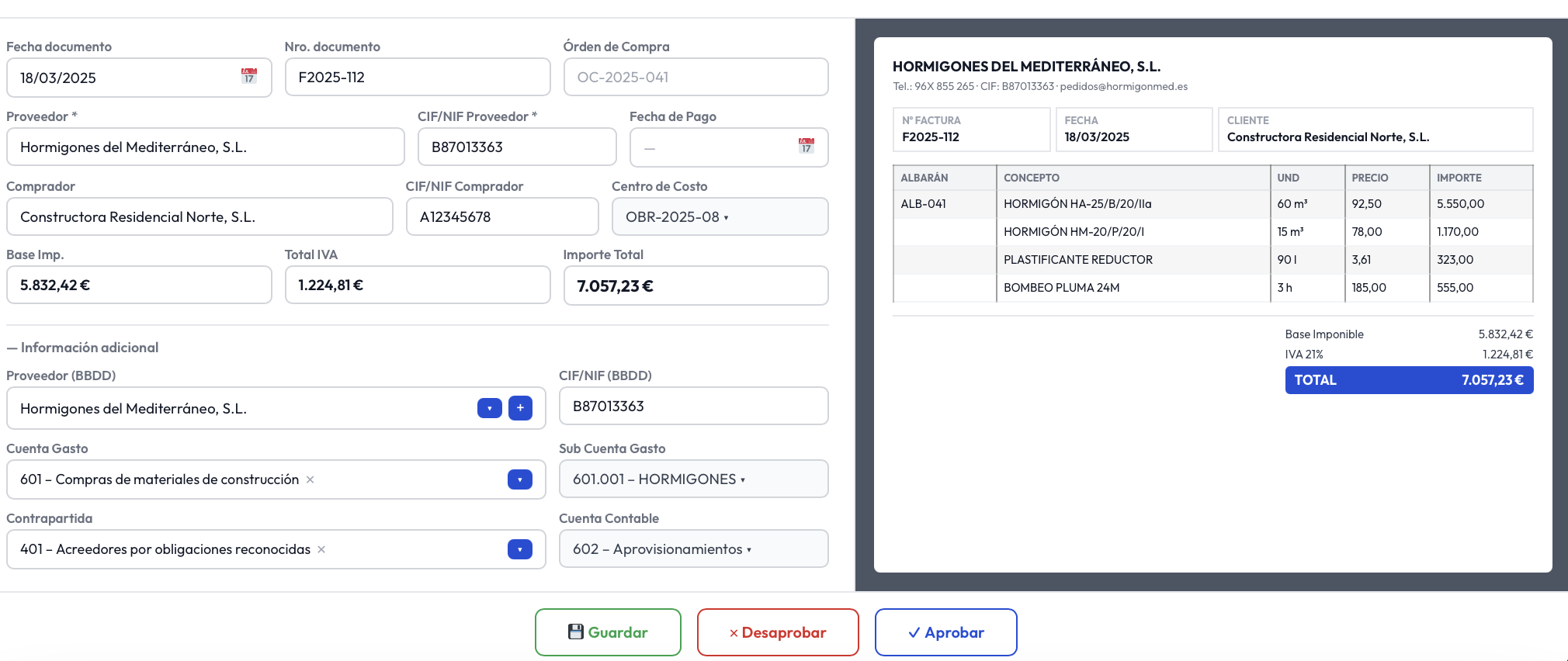
Customize extractionCapture header and supplier data
With Dijit.app, you can Extract all your delivery note data with OCR and AI in less than 3 seconds per page.
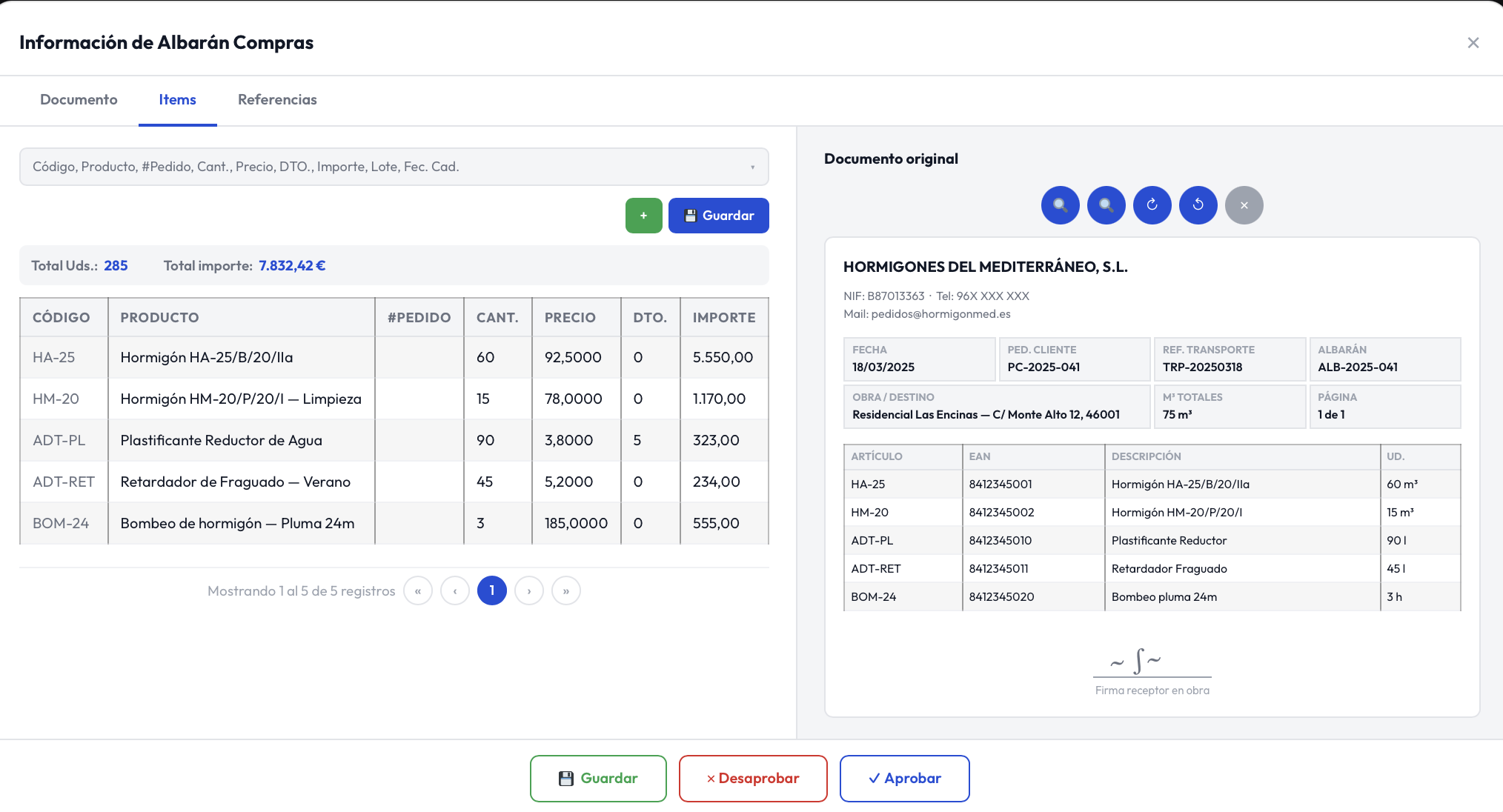
Capture the entire purchase table from the delivery note
With Dijit.app, you can Extract delivery notes with OCR and AI to obtain all the line-item details.
Process to Extract delivery notes with OCR and AI
From a photo, each site uploads the images directly from their mobile device and the data appears in the main user in real time.
Site #123 receives products and the delivery note
The person in charge takes the photo with their mobile phone
Logs into the web application with their credentials
Chooses the delivery note photos from the gallery
Clicks «upload» and that’s it
The data is sent to central administration
The data is viewed and edited
Download to Excel or import into the ERP
Save hundreds of hours and labor costs associated with manually entering delivery note data. Make decisions about inventory intake and purchase prices in real time.
99.99% reading accuracy with AI and OCR
Less than 3 seconds per page
Reading of the full purchase list
From a simple photo or scan
Eliminate paperwork
Save more than 95% of the time
One user for each receiving site
Have unlimited users for each receiving site and manage delivery notes independently. You can link a cost center to each user.
Assign a user to each location or site
Manage multiple receiving points with specific users for each location, while keeping centralized control.
Assign a cost center to each user
Organize and segment your operations by department or business area to optimize accounting management.
Read the cost center or delivery address
Automatically detect relevant data to streamline document assignment and processing.
Extract delivery notes for agile inventory management
Automate the capture of your delivery note data and update your inventory in real time. With multiple users for each receiving site, you’ll manage the flow of goods efficiently.
Automatic capture of the product list
Automatically recognize and Extract all products, quantities, and prices on the delivery note with 99.99% accuracy.
Immediate inventory update
Integrate the captured data directly into your inventory management system without manual entry.
Multi-user management by site
Assign users to each receiving site and organize the workflow with department-specific permissions.
Your information, always protected
Our intelligent processing software meets the highest European security standards. Your data never leaves the EU.
We guarantee privacy: we do not share your company data with AI models.
Microsoft Partner Certified
Impenetrable cloud security infrastructure with official Microsoft certification.
Security and CertificationsAzure Data Base — EU
Your data is always safe in Azure’s European databases. GDPR privacy guaranteed.
Data privacyEnd-to-end encryption
Documents encrypted in transit and at rest. Access with multi-factor authentication and role-based permissions.
TLS 1.3 EncryptionGDPR compliance
Configurable retention policies, right to be forgotten, and full access traceability.
GDPR CompliantAvailable integrations
Export your delivery note data without errors directly to your ERP, accounting software, or management system.
More than 15,000 satisfied users
Thousands of hours of manual work saved thanks to our intelligent extraction platform specialized by sector.
- Different VAT and surcharges
- Income tax and other taxes
- Invoice detection
- Automatic account assignment
- Full purchase list
- Batch and expiration date
- Price control
- POS integration
- Special site delivery notes
- Work reports
- Site code capture
- ERP integration
- Capture origin and destination
- Services, freight, and insurance
- Carrier license plate
- ERP integration
- Check-in/check-out detection
- Pax name and codes
- Detects commissions
- Download in Excel
- Production reports
- Full purchase list
- Price control
- ERP integration
- Header and VAT capture
- Receipt reading
- Purchase list
- Duplicate detection
- Sales delivery notes
- Consolidation with orders
- Price control
- ERP integration
Try our technology for free
Extract and process your delivery notes with the most advanced AI on the market. No implementation costs or commitment.
Why Extract delivery notes with Dijit.app?
Compare the results of working with and without an intelligent extraction software in your company.
Frequently asked questions
Everything you need to know about digitizing delivery notes with OCR and AI.