

Match delivery notes to invoices automatically with AI
Delivery notes and invoices rarely arrive together. Dijit.app reads them and matches each invoice to its delivery notes with AI — you confirm with one click and it posts the result to Xero, QuickBooks, SAP or Business Central, with the original document attached.
Why is matching delivery notes to invoices so hard?
Because it's a puzzle with missing pieces: one invoice covers several delivery notes and nothing says which ones. The note is paper signed in the warehouse; the invoice is a PDF in the office — and they don't even use the same words.
A many-to-one puzzle
One invoice covers a month of deliveries, and nothing on it is obliged to say which notes. That leaves up to 50 candidates from that supplier, sorted newest first, to find the right 3 in.
The time gap
Goods arrive with the note; the invoice lands weeks later, sometimes 60 days. References like "as per your delivery note no." are optional — many suppliers never quote them.
Same goods, different words
The note says "FLOUR T-55 25KG SACK"; the invoice says "Bread flour 25kg". Same product, zero match. Every supplier uses its own codes and descriptions.
Numbers that legitimately disagree
Partial deliveries, returns, price changes, carriage added on the invoice. Totals aren't always meant to match exactly, so "does it add up?" takes judgement.
And one wrong pick poisons two matches: assign a note to the wrong invoice and neither reconciles. At hundreds of invoices a month, the only manual fix is more people.
How does Dijit.app match a delivery note to an invoice that arrives weeks later?
When an invoice comes in, four checks shortlist the right delivery notes in seconds — and the AI turns the shortlist into a proposal you confirm. Generic invoice-capture tools read documents one by one; Dijit.app connects them to each other.
Supplier filter
The OCR reads the supplier's VAT number on the invoice and groups it with every delivery note from that same supplier.
Reference reading
The AI scans the body of the invoice for quoted delivery note numbers — phrases like "As per your delivery note no." — and uses them as anchors.
Time window
It searches that supplier's delivery notes from the 60 days before the invoice date. The window is configurable to how your suppliers invoice.
Amount check
It adds up the totals of the shortlisted delivery notes and compares them with the invoice total. An exact match confirms the pairing.
Then the AI builds the proposal
Every invoice line accounted for across the shortlisted notes, differently worded lines paired with the reasoning shown, and the proposal placed on top of the screen.
You confirmWhat do you see when a match is found?
Every proposed match gets a confidence score. And when a match needs a look, the AI now does the looking first — you keep the final click.
When it needs a look, the AI looks first
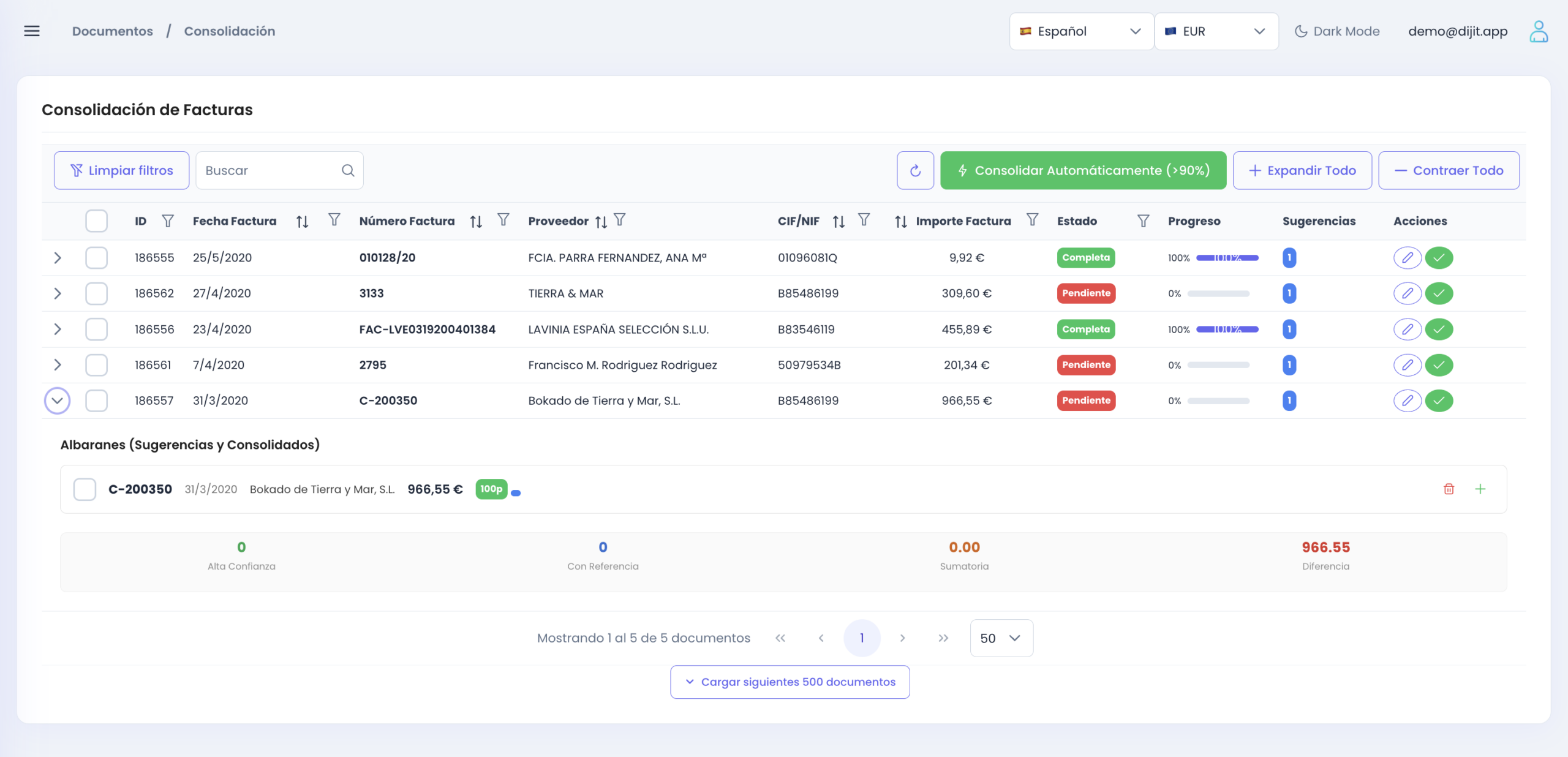
An unmatched invoice used to mean hunting the right delivery notes among up to 50 candidates, sorted newest first. Now the screen opens instantly — nothing waits for the AI — and a second or two later a proposal appears on top:
Proposed: delivery notes A-123, A-125, A-128 — £4,812.40 = invoice total ✓
Every invoice line is accounted for in these 3 notes (2 lines paired by AI, shown below).
Confirm all 3The other 47 candidates collapse underneath, still reachable.
On the line view, lines that mean the same but read differently — "FLOUR T-55 25KG SACK" on the delivery note, "Bread flour 25kg" on the invoice — come pre-paired and labelled as AI-paired, with the reasoning shown, so you can tell them from exact pairs at a glance.
It never auto-confirms
The confirm click is always yours. Un-matching and manual picks work exactly as before, and a manual pick always wins over the AI.
No green tick without the numbers
If the amounts don't add up, there is no confirmed-style proposal. You see "AI suggests these 3, but £210.50 is unaccounted for" — and it stays an ordinary suggestion.
Nothing waits for the AI
The matching screen opens identically and instantly, with or without AI. The proposal appears a second or two later, on top.
Same answer, instantly
Reopening the invoice shows the same proposal at once. It only recomputes if new delivery notes from that supplier have arrived.
Which accounting software does it post to?
Matched and validated documents don't stay in Dijit.app. They go into the software you already work with, ready to approve.
Xero
Dijit.app creates draft bills with the data already extracted, assigns the VAT codes and attaches the original document to the transaction. You review and approve inside Xero — no retyping.
QuickBooks
The same flow for QuickBooks: draft bills ready to approve, tax codes assigned and the source document kept with the entry. Your ledger stays the place where you work.
SAP
Native connectors for SAP Business One and SAP S/4HANA send purchase documents with lines, accounts and taxes in place — matched delivery notes and invoices included.
Business Central
A native connector for Microsoft Dynamics 365 Business Central posts delivery note and invoice data with accounts and taxes assigned, ready to register.
Your information, always protected
Our intelligent processing software meets the highest European security standards. Your data never leaves the EU, a location the UK officially accepts as secure. We guarantee privacy: we don't share your company's data with the AI models.
Microsoft Partner Certified
Cloud security infrastructure certified by Microsoft.
Security and CertificationsAzure database — EU
Your data always safe in Azure's European databases. Privacy in line with UK and EU GDPR.
Data privacyEnd-to-end encryption
Documents encrypted in transit and at rest. Access with multifactor authentication and role-based permissions.
TLS 1.3 encryptionUK and EU GDPR compliance
Configurable retention policies, right to be forgotten and full access traceability.
GDPR compliantWhich sectors need delivery note matching most?
Anywhere goods arrive before the invoice does. The vocabulary changes — delivery notes, goods received notes, GRNs — but the gap is the same.
Construction
- Dozens of subcontractors per project
- Delivery notes assigned to the right job
- Work reports and site deliveries
Wholesale and distribution
- Daily inbound deliveries
- Monthly supplier invoices
- Supplier statements reconciled
Manufacturing
- Raw materials checked on receipt
- GRNs against purchase orders
- No production stops over paperwork
Retail and e-commerce
- Hundreds of suppliers
- Margins protected from price slips
- Duplicate invoices detected
Hospitality
- Perishables delivered daily
- Weekly or monthly invoicing
- Cost control per site
Accounting firms
- Clients' purchase documents in one flow
- Draft bills ready to approve
- Digital records kept per client
What changes when the matching is automatic?
| ✅ WITH Dijit.app | ❌ WITHOUT Dijit.app |
|---|---|
| ⚡Each invoice matched to its delivery notes in seconds | 🐢Hunting through folders for last month's delivery notes |
| 🎯99% reading accuracy, with assisted review for doubtful cases | ⚠️Transcription slips that surface after payment |
| 🤝Differently worded lines paired by AI, with the reasoning shown | 🧩"No match" on every line where the wording differs, resolved by eye |
| 🔍Discrepancies flagged before the invoice is approved | 💸Duplicate payments and paying for goods never received |
| 🔌Draft bills in Xero or your ERP with the document attached | 🔁Retyping the same data into the accounting software |
| 📈From 100 up to 100,000+ documents a month, same team | 🚧More volume means hiring more people to check paperwork |
Stop pairing paperwork by hand
Send us a week's worth of your delivery notes and invoices and watch them come back matched, with draft bills ready in your software. No implementation costs or commitment.
See pricing for businesses · for accounting firms