
🤖
AI matching of delivery notes
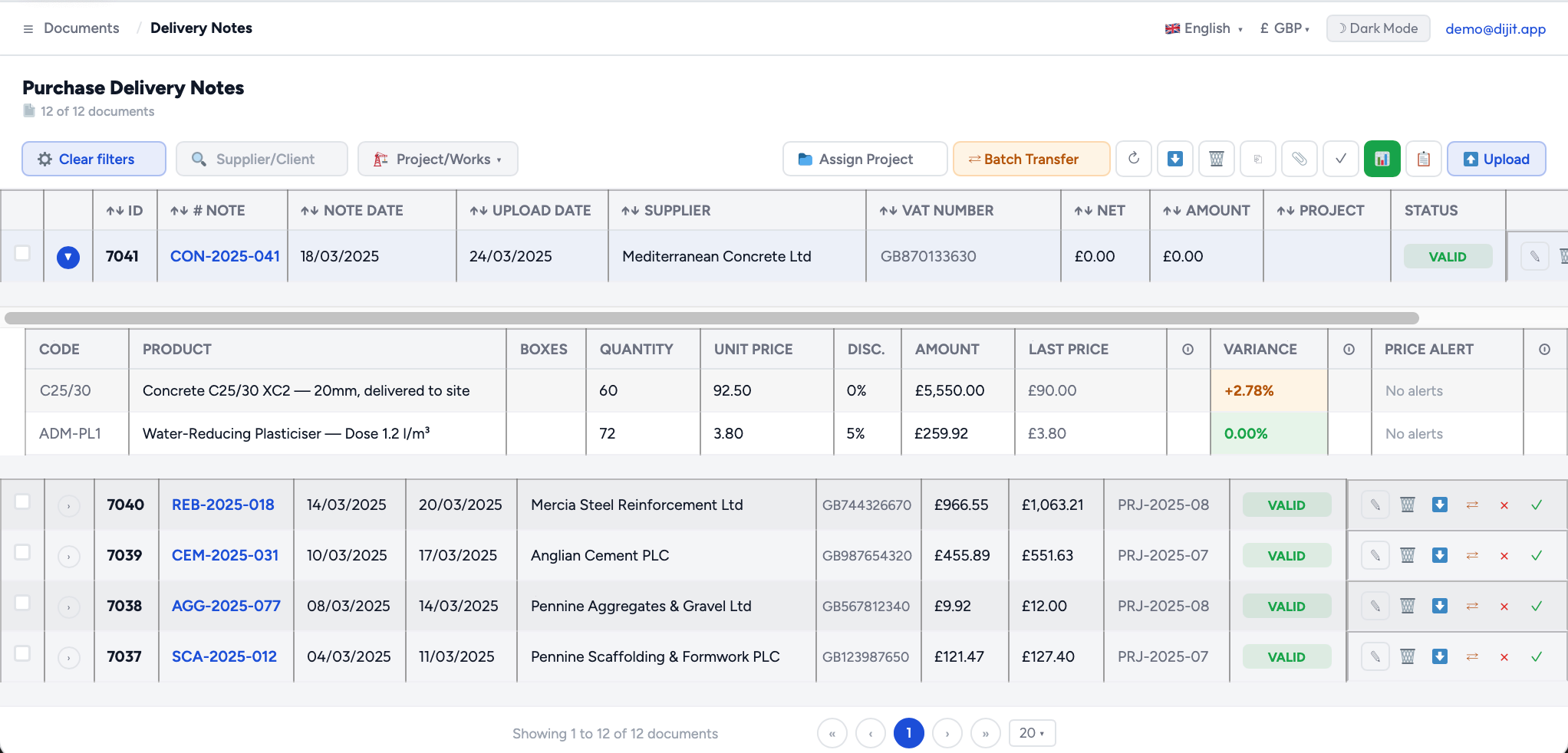
Deliveries are captured on arrival and matched by AI against the bill that covers them. Delivery notes never leave Dijit: Xero receives one accurate bill, not forty fragments.
AI and OCR for your delivery notes and invoices, match and post them straight into Xero as draft bills, with the original document attached.
Dijit reads every purchase document you receive, matches your delivery notes with AI against the bill that covers them, and sends one clean bill to Xero with the correct supplier, VAT code and nominal code. No typing, no rekeying, no paper folder for the accountant.
Plus all the document and procurement management extra features, in one single price.
Nine capabilities that connect your purchase documents with your Xero and remove the manual work of matching, coding and typing bills.
Deliveries are captured on arrival and matched by AI against the bill that covers them. Delivery notes never leave Dijit: Xero receives one accurate bill, not forty fragments.
Authorised through Xero's own login, per company, revocable at any time.
Dijit reads your nominal codes directly from your Xero organisation.
The tax codes set up in your Xero are the ones used. If a rate is missing, Dijit stops and tells you instead of guessing.
Every line with its description, quantity, price, discount and VAT rate, split across nominal codes where the document warrants it.
Not by a name that could be spelled three ways. If the supplier does not exist in Xero, Dijit creates it.
The supplier's PDF or the photo of the paper note travels with the bill, ready for Making Tax Digital.
Bills arrive as drafts for review by default, or posted directly if you prefer.
Dijit checks before sending and refuses to overwrite a bill your bookkeeper has already touched.
Purchase administration, solved by artificial intelligence.
Xero is very good at bills. It has no idea what a delivery note is.
So the goods arrive on Tuesday with a paper note. Thursday, another one. The following week, three more. Six weeks later a single invoice lands covering forty deliveries, and someone has to work out whether the invoice matches what actually turned up: were all the deliveries invoiced, were the quantities right, did the agreed price hold on every line.
Most capture tools cannot help until that invoice arrives, and even then they hand you a supplier, a date and a total. Enough to pay the bill. Useless for knowing whether you should.
That work —collecting delivery notes, matching them against the bill, coding the result and typing it into the accounts— is slow, repetitive, and the place where overcharges quietly live.
Dijit automates exactly that. It captures the delivery note the day it arrives, matches it against the bill when the bill comes, and posts the result into Xero already coded, so the person goes from doing the work to simply supervising it.

From the physical document to the bill in your accounts, in four steps.
Dijit's integration with Xero turns a manual and tedious process into a guided, almost automatic flow.
One click from inside Dijit, authorised through Xero's own login. Dijit never sees your Xero password. On connecting, the platform reads your chart of accounts and your VAT rates so it can work with your setup, not a generic one.
Delivery notes and invoices are read with 99% accuracy: supplier, VAT number, dates, references, and the full list of lines with descriptions, quantities, prices, discounts and VAT rates. Documents can arrive by upload, by email, from a cloud folder, or photographed on a phone at the door.
When the bill arrives, the AI finds the delivery notes it covers —same supplier, referenced in the invoice body, within the trading period, adding up to the invoice total— and assigns a confidence level to the match. A clean match goes through untouched; only the doubtful ones need a person.
You review, adjust anything that needs adjusting, and confirm. Dijit creates the bill in Xero against the right supplier, with the right VAT code on each line, the right nominal code, and the original document attached.
Delivery notes are never sent to Xero, on purpose. Xero has no delivery note, and posting one as a bill would double your supplier balance the moment the real bill arrived. Delivery notes are captured, held and matched inside Dijit; Xero receives the bill, already matched.
The AI understands that “torn. M6 inoxidable” and “stainless steel M6 screw” are the same item.
The big difference compared with a traditional automatic match lies in intelligence. Conventional systems only match when references or descriptions are identical character by character, and in the real world that almost never happens: every supplier names its products differently, abbreviates them in its own way, and orders the lines however it likes.
Dijit's artificial intelligence understands meaning, not just text. It recognises that two different descriptions refer to the same item, and it holds corrections per supplier and per company, so a fix you make once is applied to every document from that supplier from then on. The supplier that prints discounts in the wrong column stops being your problem after the first occurrence.
And because every match carries its confidence level, you always keep the final say.
Matching the documents is only half the job.
Once you confirm, Dijit creates the purchase bill directly in Xero and keeps its reference, leaving the operation documented and traceable inside your accounts.
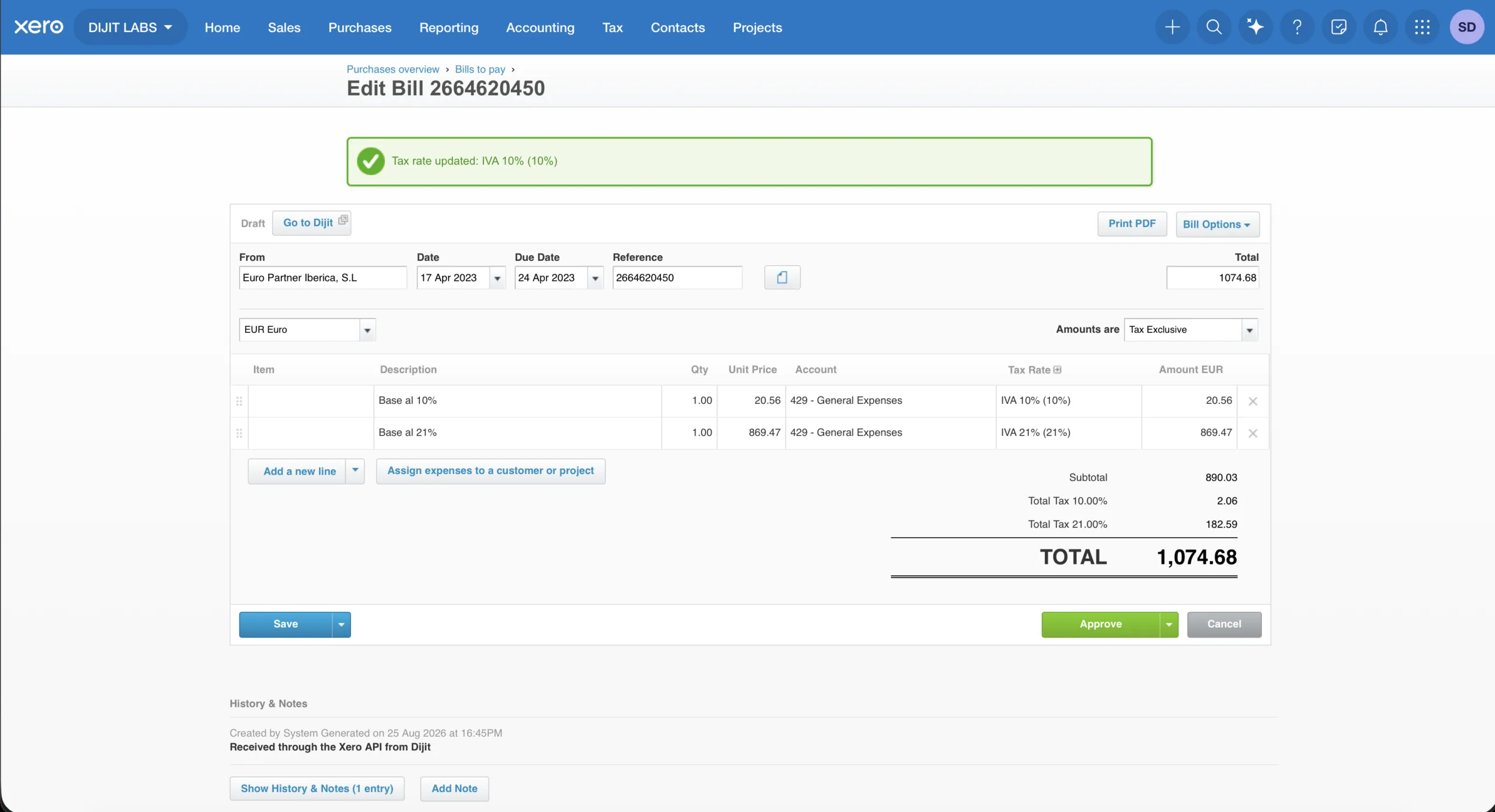
Matched on VAT number rather than on a name, and created in Xero automatically if it does not exist yet.
The tax codes used are the ones set up in your Xero organisation. If an invoice carries a rate you have not configured, Dijit refuses to send it and tells you which rate is missing, rather than substituting something close and filing it wrong.
A default nominal code for the company, and line-level coding where the document justifies splitting the bill.
Bills arrive as drafts for review by default. If you would rather they post straight through, that is a setting.
Before sending, Dijit checks whether the document has already gone to Xero, and refuses to overwrite a bill somebody has since edited.
Send one invoice or a hundred. If one fails, the rest still go through, and you are told exactly which document stopped and why, in plain words.
The original document, kept with the transaction it belongs to.
Making Tax Digital asks for more than accurate figures. It asks for a digital audit trail: the source document, preserved and linked to the transaction it relates to.
Every bill Dijit creates arrives in Xero with its source attached —the supplier's PDF, or the photograph of the paper delivery note taken at the door. Open the bill in Xero, click the attachment, and there is the original.
No separate filing system, no shoebox of paper for the accountant in January, and nothing to reconstruct if you are ever asked to show your workings.
Much more than posting a bill: a complete connection with your accounts.
Your nominal codes are read directly from your Xero organisation, so coding uses your accounts with your names, not an imported copy that drifts out of date.
The tax codes configured in your Xero are read and used as they are, which matters because no two businesses run the same set.
Suppliers are located in Xero by VAT number, and created there when they are new, with no duplicate contacts left behind.
Base, VAT and total, line by line, with the coding already applied.
The original file is uploaded to the bill it belongs to.
The link with your Xero renews itself and reports its own status, so a connection that needs attention is visible before it becomes a problem.
And as Xero's platform evolves constantly, the integration is ready to expand and take advantage of new capabilities as each customer's needs require.
Each entity, against its own Xero organisation.
Many organisations manage more than one company, and accounting practices manage dozens. Dijit is built for that: each company has its own secure, independent connection to Xero, so information from one never mixes with another.
Automation works for you, but the decisions remain yours.
The connection between Dijit and Xero is made through Xero's own standard authorisation, per company: you approve it from your Xero login, Dijit never holds your password, and you can revoke it at any moment from inside Dijit.
You approve the connection in Xero itself, and you can disconnect whenever you want. Bills already in your accounts remain yours.
Authorised accessDijit does the heavy lifting —reading, understanding, matching and coding— but the bill is created when you confirm it, and it arrives as a draft unless you decide otherwise.
You confirmAny team member can use it from day one: you review the match, adjust what is needed, and give the green light. Nothing more, nothing less.
Easy to useOur intelligent processing software meets the highest European security standards. Your data never leaves the EU.
We guarantee privacy: we do not share your company data with AI models. Every document is processed inside Microsoft Azure's private AI infrastructure.
Cloud infrastructure with impenetrable security and official Microsoft certification.
Security and CertificationsYour data is always safe in Azure's European databases. GDPR privacy guaranteed.
Data privacyDocuments encrypted in transit and at rest. Access with multi-factor authentication and role-based permissions.
TLS 1.3 EncryptionConfigurable retention policies, right to be forgotten, and full access traceability.
GDPR CompliantOur automation system integrates natively with the main ERPs and business software.
Thousands of hours of manual work saved thanks to our intelligent extraction platform specialized by sector.
Our digitization tool recognizes and processes all types of business documents.
Can't find the document type you need? We train our system to adapt it to your specific needs.
Digitize and process your received invoices and delivery notes with the most advanced AI on the market. No implementation costs or commitment.

Compare the results of working with and without an intelligent extraction software in your company.
Everything you need to know about how Dijit matches your delivery notes and bills and posts them into Xero.